> ## Documentation Index
> Fetch the complete documentation index at: https://docs.modelslab.com/llms.txt
> Use this file to discover all available pages before exploring further.
# ControlNet Main
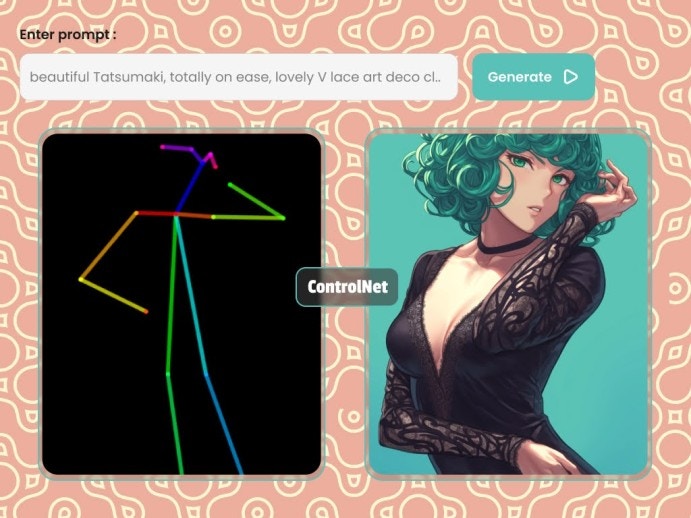
> Control Stable Diffusion generations with ControlNet.
The ControlNet [models](#models) are available in this API.
You can also use this endpoint to inpaint images with ControlNet. Just make sure to pass the link to the `mask_image` in the request body and use the `controlnet_model` parameter with "inpaint" value.
 ## Request
Send a `POST` request to below endpoint.
```curl curl theme={null}
--request POST 'https://modelslab.com/api/v5/controlnet' \
```
## Models
ControlNet API using ControlNet 1.1 as the default: Supported ControlNet Models:
For Flux ControlNet, use
```json theme={null}
`model_id`: `fluxdev`
```
which supports following controlnet types:
`canny`, `tile`, `depth` , `blur`, `pose`, `gray` and `low_quality`.
| **ControlNet Model/Type** | **SDXL** | **SD1.5** | **FluxDev** |
| ------------------------- | -------- | --------- | ----------- |
| **Canny** | Yes | Yes | Yes |
| **Tile** | Yes | Yes | Yes |
| **Depth** | Yes | Yes | Yes |
| **Blur** | Yes | Yes | Yes |
| **Pose** | Yes | Yes | Yes |
| **MLSD** | Yes | Yes | No |
| **Lineart** | Yes | Yes | No |
| **HED** | Yes | Yes | No |
| **Normal** | Yes | Yes | No |
| **OpenPose** | Yes | Yes | No |
| **Segmentation** | Yes | Yes | No |
| **Inpaint** | Yes | Yes | No |
| **SoftEdge** | Yes | Yes | No |
| **Shuffle** | Yes | Yes | No |
| **QRCode** | Yes | Yes | No |
| **Low Quality** | No | No | Yes |
| **Gray** | No | No | Yes |
### ControlNet Types Overview
| Type | Description | Best For |
| ------------- | ----------------------- | --------------------------------------- |
| **Canny** | Edge detection | Line art, outlines, structural control |
| **Depth** | Depth map control | 3D structure, perspective control |
| **HED** | Advanced edge detection | Detailed edge preservation |
| **MLSD** | Line segment detection | Architecture, geometric structures |
| **Normal** | Surface normal maps | 3D lighting, surface details |
| **Scribble** | Sketch to image | Converting drawings to realistic images |
| **In-Paint** | Fill masked areas | Removing or replacing objects |
| **Soft Edge** | Smooth edge detection | Natural, organic shapes |
| **Line Art** | Clean line art | Anime, cartoon, illustration styles |
### Key Parameters
* **controlnet\_type** & **controlnet\_model**: Must match the desired control method
* **auto\_hint**: Set to "yes" to automatically process input images
* **controlnet\_conditioning\_scale**: Controls strength (0.1-2.0, default 0.5-1.0)
* **init\_image**: Source image for control guidance
* **mask\_image**: Required only for inpainting
## Body
You can also use multi ControlNet. Just make sure to pass comma separated controlnet models to the `controlnet_model` as `canny,depth` and `init_image` in the request body.
# ControlNet API Examples
```json theme={null}
{
"key": "your_api_key",
"controlnet_model": "canny",
"controlnet_type": "canny",
"model_id": "realistic-vision-51",
"auto_hint": "yes",
"guess_mode": "no",
"prompt": "a girl, wearing red bikini, looking at camera, ocean in background",
"negative_prompt": "human, unstructure, (black object, white object), colorful background, nsfw",
"init_image": "https://assets.modelslab.ai/generations/a8572240-3040-4fd8-b9f4-aeaaf4fe287d",
"mask_image": null,
"width": "512",
"height": "512",
"samples": "1",
"scheduler": "UniPCMultistepScheduler",
"num_inference_steps": "30",
"safety_checker": "no",
"enhance_prompt": "yes",
"guidance_scale": 7.5,
"strength": 0.55,
"seed": null,
"webhook": null,
"track_id": null
}
```
```json theme={null}
{
"key": "your_api_key",
"controlnet_model": "depth",
"controlnet_type": "depth",
"model_id": "realistic-vision-51",
"auto_hint": "yes",
"guess_mode": "no",
"prompt": "baby, smiling",
"negative_prompt": null,
"init_image": "https://img.freepik.com/free-photo/adorable-baby-boy-smiling-camera-blurred-background_132075-10819.jpg",
"mask_image": null,
"width": "512",
"height": "512",
"samples": "1",
"scheduler": "UniPCMultistepScheduler",
"num_inference_steps": "30",
"safety_checker": "no",
"enhance_prompt": "yes",
"guidance_scale": 7.5,
"strength": 0.55,
"seed": null,
"webhook": null,
"track_id": null
}
```
```json theme={null}
{
"key": "your_api_key",
"controlnet_model": "hed",
"controlnet_type": "hed",
"model_id": "realistic-vision-51",
"auto_hint": "yes",
"guess_mode": "no",
"prompt": "baby, smiling",
"negative_prompt": null,
"init_image": "https://images-ext-1.discordapp.net/external/XM1tvX0cyqZOqfpRdT2BnzhaZo-Z525hXaSAD46gHJY/https/i.pinimg.com/736x/b0/a6/49/b0a649108926efec22c2fd055208955a.jpg",
"mask_image": null,
"width": "512",
"height": "512",
"samples": "1",
"scheduler": "UniPCMultistepScheduler",
"num_inference_steps": "30",
"safety_checker": "no",
"enhance_prompt": "yes",
"guidance_scale": 7.5,
"strength": 0.55,
"seed": null,
"webhook": null,
"track_id": null
}
```
```json theme={null}
{
"key": "your_api_key",
"controlnet_model": "mlsd",
"controlnet_type": "mlsd",
"model_id": "realistic-vision-51",
"auto_hint": "yes",
"guess_mode": "no",
"prompt": "ROOM INTERIOR, OLD SCHOOL, VINTAGE",
"negative_prompt": null,
"init_image": "https://images-ext-1.discordapp.net/external/f_MuFioFIYcAuhbGrCXkiDfRJq1nZd-L0z_DibDpMc0/https/i.pinimg.com/736x/8a/2b/1e/8a2b1e6ca4779d787ae3c98b7b1100b2.jpg",
"mask_image": null,
"width": "512",
"height": "512",
"samples": "1",
"scheduler": "UniPCMultistepScheduler",
"num_inference_steps": "30",
"safety_checker": "no",
"enhance_prompt": "yes",
"guidance_scale": 7.5,
"strength": 0.55,
"seed": null,
"webhook": null,
"track_id": null
}
```
```json theme={null}
{
"key": "your_api_key",
"controlnet_model": "normal",
"controlnet_type": "normal",
"model_id": "realistic-vision-51",
"auto_hint": "yes",
"guess_mode": "no",
"prompt": "a woman, posing",
"negative_prompt": null,
"init_image": "https://images-ext-1.discordapp.net/external/ZOjUvfZxcvlnt84xav_fDdIzXPuuMXcW9fA46OaZSTs/https/i.pinimg.com/736x/9d/09/ff/9d09ff904e082395f71aa12f5c83ea77.jpg",
"mask_image": null,
"width": "512",
"height": "512",
"samples": "1",
"scheduler": "UniPCMultistepScheduler",
"num_inference_steps": "30",
"safety_checker": "no",
"enhance_prompt": "yes",
"guidance_scale": 7.5,
"strength": 0.55,
"seed": null,
"webhook": null,
"track_id": null
}
```
```json theme={null}
{
"key": "your_api_key",
"controlnet_model": "scribble",
"controlnet_type": "scribble",
"model_id": "realistic-vision-51",
"auto_hint": "yes",
"guess_mode": "no",
"prompt": "a woman, posing",
"negative_prompt": null,
"init_image": "https://images-ext-1.discordapp.net/external/2p2KWmaWToQXVSKJnVDbmjaHJHr1-Cx4F84O8l7mhEE/https/i.pinimg.com/736x/30/0c/20/300c209d4a1396c89bf7ea32eefcce95.jpg",
"mask_image": null,
"width": "512",
"height": "512",
"samples": "1",
"scheduler": "UniPCMultistepScheduler",
"num_inference_steps": "30",
"safety_checker": "no",
"enhance_prompt": "yes",
"guidance_scale": 7.5,
"strength": 0.55,
"seed": null,
"webhook": null,
"track_id": null
}
```
```json theme={null}
{
"key": "your_api_key",
"controlnet_model": "inpaint",
"controlnet_type": "inpaint",
"model_id": "realistic-vision-51",
"auto_hint": "yes",
"guess_mode": "no",
"prompt": "bearded man",
"negative_prompt": null,
"init_image": "https://images-ext-1.discordapp.net/external/oo7VfGo6xDAXQIRP_k3RB5c7l4oEv4grWgkeG4xdUvc/https/i.pinimg.com/736x/0e/04/e0/0e04e00081774f01efd980f1c99ba69a.jpg",
"mask_image": "https://images-ext-1.discordapp.net/external/fn7yNKSonZwSLzvprcJR5pCiacxwsaEIHQO54dK3Y7E/https/i.pinimg.com/736x/98/23/64/98236482e403a18695caaac6aac733ba.jpg",
"width": "512",
"height": "512",
"samples": "1",
"scheduler": "UniPCMultistepScheduler",
"num_inference_steps": "30",
"safety_checker": "no",
"enhance_prompt": "yes",
"guidance_scale": 7.5,
"strength": 0.55,
"seed": null,
"webhook": null,
"track_id": null
}
```
```json theme={null}
{
"key": "your_api_key",
"controlnet_model": "softedge",
"controlnet_type": "softedge",
"model_id": "realistic-vision-51",
"auto_hint": "yes",
"guess_mode": "no",
"prompt": "man",
"negative_prompt": null,
"init_image": "https://images-ext-1.discordapp.net/external/XGH2QUbobf3UWY6ldA9hOp9lhV8FZvCpZfmbZAvceeY/https/i.pinimg.com/736x/49/cc/b4/49ccb461e72b11f5d5f297eb267365c9.jpg",
"mask_image": "",
"width": "512",
"height": "512",
"samples": "1",
"scheduler": "UniPCMultistepScheduler",
"num_inference_steps": "30",
"safety_checker": "no",
"enhance_prompt": "yes",
"guidance_scale": 7.5,
"strength": 0.55,
"seed": null,
"webhook": null,
"track_id": null
}
```
```json theme={null}
{
"key": "your_api_key",
"controlnet_model": "lineart",
"controlnet_type": "lineart",
"model_id": "realistic-vision-51",
"auto_hint": "yes",
"guess_mode": "no",
"prompt": "beautiful girl",
"negative_prompt": null,
"init_image": "https://www.shutterstock.com/image-illustration/beautiful-anima-samurai-girl-katana-600nw-2111398124.jpg",
"mask_image": "",
"width": "512",
"height": "512",
"samples": "1",
"scheduler": "UniPCMultistepScheduler",
"num_inference_steps": "30",
"safety_checker": "no",
"enhance_prompt": "yes",
"guidance_scale": 7.5,
"strength": 0.55,
"seed": null,
"webhook": null,
"track_id": null
}
```
```json theme={null}
{
"key": "your_api_key",
"model_id": "boziorealvisxlv4",
"init_image": "https://i.pinimg.com/736x/03/a0/4d/03a04d738c9aba3c4b84caa3a5b912ae.jpg",
"prompt": "hot girl wearing, pink dress, high quality, 4k",
"negative_prompt": "(normal quality), (low quality), (worst quality), Scandinavian Living Room paintings, sketches, fog, signature, soft, blurry, drawing, sketch, poor quality, ugly text, type, word, logo, pixelated, low resolution, saturated, high contrast, oversharpened, dirt",
"auto_hint": "yes",
"guess_mode": "no",
"strength": 1,
"controlnet_conditioning_scale": "0.5",
"guidance_scale": 5,
"tomesd": "yes",
"seed": null,
"samples": 1,
"num_inference_steps": 21,
"webhook": null,
"track_id": null,
"scheduler": "DPMSolverMultistepScheduler",
"use_karras_sigmas": "yes",
"base64": null,
"clip_skip": 2,
"controlnet_type": "canny",
"controlnet_model": "canny",
"upscale": "no"
}
```
```json theme={null}
{
"key": "your_api_key",
"model_id": "boziorealvisxlv4",
"init_image": "https://i.pinimg.com/736x/03/a0/4d/03a04d738c9aba3c4b84caa3a5b912ae.jpg",
"prompt": "hot girl wearing, pink dress, high quality, 4k",
"negative_prompt": "(normal quality), (low quality), (worst quality), Scandinavian Living Room paintings, sketches, fog, signature, soft, blurry, drawing, sketch, poor quality, ugly text, type, word, logo, pixelated, low resolution, saturated, high contrast, oversharpened, dirt",
"auto_hint": "yes",
"guess_mode": "no",
"strength": 1,
"controlnet_conditioning_scale": "0.5",
"guidance_scale": 5,
"tomesd": "yes",
"seed": null,
"samples": 1,
"num_inference_steps": 21,
"webhook": null,
"track_id": null,
"scheduler": "DPMSolverMultistepScheduler",
"use_karras_sigmas": "yes",
"base64": null,
"clip_skip": 2,
"controlnet_type": "depth",
"controlnet_model": "depth",
"upscale": "no"
}
```
## OpenAPI
````yaml POST /controlnet
openapi: 3.1.0
info:
title: ModelsLab ControlNet API
description: >-
A comprehensive API for AI-driven image generation using ControlNet models
with Stable Diffusion. Control image generation with various ControlNet
models including canny, depth, pose, and more.
license:
name: MIT
version: 5.0.0
servers:
- url: https://modelslab.com/api/v5
security: []
paths:
/controlnet:
post:
summary: Generate images using ControlNet
description: >-
Generate images using ControlNet models to control Stable Diffusion.
Supports single and multi-ControlNet configurations, inpainting, and
various image modification techniques.
requestBody:
required: true
content:
application/json:
schema:
$ref: '#/components/schemas/ControlNetRequest'
responses:
'200':
description: ControlNet generation response
content:
application/json:
schema:
$ref: '#/components/schemas/ControlNetResponse'
'400':
description: Bad request
content:
application/json:
schema:
$ref: '#/components/schemas/Error'
components:
schemas:
ControlNetRequest:
type: object
required:
- key
properties:
key:
type: string
description: Your API Key used for request authorization
model_id:
type: string
description: >-
The ID of the model to be used. It can be public or your trained
model. Note: Multi ControlNet does not apply when using model with
'flux'
controlnet_model:
type: string
description: >-
ControlNet model ID. Can be single model or comma-separated for
multi-ControlNet (e.g., 'canny,depth,openpose')
enum:
- canny
- depth
- hed
- mlsd
- normal
- openpose
- scribble
- segmentation
- inpaint
- softedge
- lineart
- shuffle
- tile
- face_detector
- qrcode
- blur
- pose
- gray
- low_quality
controlnet_type:
type: string
description: >-
ControlNet model type. Should match one of the controlnet_model
values
enum:
- canny
- depth
- hed
- mlsd
- normal
- openpose
- scribble
- segmentation
- inpaint
- softedge
- lineart
- shuffle
- tile
- face_detector
- qrcode
- blur
- pose
- gray
- low_quality
auto_hint:
type: string
enum:
- 'yes'
- 'no'
default: 'yes'
description: Auto hint image generation
guess_mode:
type: string
enum:
- 'yes'
- 'no'
default: 'no'
description: >-
Set to 'yes' if you don't pass any prompt. The model will try to
guess what's in the init_image and create best variations
prompt:
type: string
description: >-
Text prompt with description of required image modifications. Make
it as detailed as possible for best results
negative_prompt:
type: string
description: Items you don't want in the image
init_image:
type: string
format: uri
description: Link to the initial image to be used as a reference
control_image:
type: string
format: uri
description: Link to the ControlNet image
mask_image:
type: string
format: uri
description: Link to the mask image for inpainting
width:
type: integer
minimum: 64
maximum: 1024
default: 512
description: Width of the generated image. Maximum 1024x1024
height:
type: integer
minimum: 64
maximum: 1024
default: 512
description: Height of the generated image. Maximum 1024x1024
samples:
type: integer
minimum: 1
maximum: 4
default: 1
description: Number of images to be returned in response. Maximum value is 4
scheduler:
type: string
enum:
- DDPMScheduler
- DDIMScheduler
- PNDMScheduler
- LMSDiscreteScheduler
- EulerDiscreteScheduler
- EulerAncestralDiscreteScheduler
- DPMSolverMultistepScheduler
- HeunDiscreteScheduler
- KDPM2DiscreteScheduler
- DPMSolverSinglestepScheduler
- KDPM2AncestralDiscreteScheduler
- UniPCMultistepScheduler
- DDIMInverseScheduler
- DEISMultistepScheduler
- IPNDMScheduler
- KarrasVeScheduler
- ScoreSdeVeScheduler
- LCMScheduler
default: UniPCMultistepScheduler
description: Scheduler to use for image generation
tomesd:
type: string
enum:
- 'yes'
- 'no'
default: 'yes'
description: Enable tomesd to generate images with fast results
use_karras_sigmas:
type: string
enum:
- 'yes'
- 'no'
default: 'yes'
description: Use Karras sigmas to generate images with nice results
algorithm_type:
type: string
enum:
- dpmsolver+++
- none
default: none
description: Algorithm type used in DPMSolverMultistepScheduler
vae:
type: string
description: Use custom VAE in generating images
lora_strength:
type: string
description: >-
Specify the strength of the LoRa model. If using multiple LoRa,
provide comma-separated values. Range: 0.1 to 1
lora_model:
type: string
description: >-
Multi LoRa supported, pass comma-separated values. Example:
'contrast-fix,yae-miko-genshin'
num_inference_steps:
type: integer
enum:
- 21
- 31
default: 30
description: Number of denoising steps
safety_checker:
type: string
enum:
- 'yes'
- 'no'
default: 'no'
description: A checker for NSFW images. If detected, replaces with blank image
ip_adapter_id:
type: string
enum:
- ip-adapter_sdxl
- ip-adapter_sd15
- ip-adapter-plus-face_sd15
description: IP adapter ID for additional image conditioning
ip_adapter_scale:
type: number
minimum: 0
maximum: 1
description: Scale for IP adapter, should be between 0 and 1
ip_adapter_image:
type: string
format: uri
description: Valid image URL for IP adapter
enhance_prompt:
type: string
enum:
- 'yes'
- 'no'
default: 'yes'
description: Enhance prompts for better results
controlnet_conditioning_scale:
type: number
minimum: 0.1
maximum: 5
description: Scale for ControlNet guidance. Accepts floating values from 0.1 to 5
strength:
type: number
minimum: 0
maximum: 1
default: 0.55
description: >-
Prompt strength when using init_image. 1.0 corresponds to full
destruction of information in the init image
guidance_scale:
type: number
minimum: 1
maximum: 20
default: 7.5
description: Guidance scale for generation
seed:
type: integer
description: Seed for reproducible results. Pass null for random number
webhook:
type: string
format: uri
description: URL to receive POST notification when image generation is complete
track_id:
type: integer
description: ID returned in webhook response for request identification
upscale:
type: string
enum:
- 'yes'
- 'no'
description: Upscale image resolution 2x (e.g., 512x512 becomes 1024x1024)
clip_skip:
type: integer
minimum: 1
maximum: 8
description: Clip skip value
base64:
type: string
enum:
- 'yes'
- 'no'
default: 'no'
description: >-
Get response as base64 string, pass init_image, mask_image,
control_image as base64
temp:
type: string
enum:
- 'yes'
- 'no'
default: 'no'
description: Create temporary image link valid for 24 hours
ControlNetResponse:
type: object
properties:
status:
type: string
enum:
- success
- processing
- error
description: Status of the image generation
id:
type: integer
description: Unique identifier for the image generation
output:
type: array
items:
type: string
format: uri
description: Array of generated image URLs
future_links:
type: array
items:
type: string
format: uri
description: Array of future image URLs for queued requests
meta:
type: object
description: Metadata about the image generation including all parameters used
properties:
prompt:
type: string
description: The processed prompt used for generation
model_id:
type: string
description: Model ID used for generation
controlnet_model:
type: string
description: ControlNet model(s) used
controlnet_type:
type: string
description: ControlNet type used
negative_prompt:
type: string
description: Negative prompt used
scheduler:
type: string
description: Scheduler used
safety_checker:
type: string
description: Safety checker setting
auto_hint:
type: string
description: Auto hint setting
guess_mode:
type: string
description: Guess mode setting
strength:
type: number
description: Strength value used
W:
type: integer
description: Width of generated image
H:
type: integer
description: Height of generated image
guidance_scale:
type: number
description: Guidance scale used
controlnet_conditioning_scale:
type: string
description: ControlNet conditioning scale used
seed:
type: integer
description: Seed used for generation
steps:
type: integer
description: Number of inference steps used
n_samples:
type: integer
description: Number of samples generated
clip_skip:
type: integer
description: Clip skip value used
eta:
type: number
description: Estimated time for completion in seconds (for processing status)
message:
type: string
description: Status message or additional information
messege:
type: string
description: Status message (alternative spelling used in API)
tip:
type: string
description: Additional tips or information
tip_1:
type: string
description: Additional tips or information
fetch_result:
type: string
format: uri
description: URL to fetch the result when processing
Error:
type: object
required:
- status
- messege
properties:
status:
type: string
enum:
- error
messege:
type: string
description: Error message description
````
## Request
Send a `POST` request to below endpoint.
```curl curl theme={null}
--request POST 'https://modelslab.com/api/v5/controlnet' \
```
## Models
ControlNet API using ControlNet 1.1 as the default: Supported ControlNet Models:
For Flux ControlNet, use
```json theme={null}
`model_id`: `fluxdev`
```
which supports following controlnet types:
`canny`, `tile`, `depth` , `blur`, `pose`, `gray` and `low_quality`.
| **ControlNet Model/Type** | **SDXL** | **SD1.5** | **FluxDev** |
| ------------------------- | -------- | --------- | ----------- |
| **Canny** | Yes | Yes | Yes |
| **Tile** | Yes | Yes | Yes |
| **Depth** | Yes | Yes | Yes |
| **Blur** | Yes | Yes | Yes |
| **Pose** | Yes | Yes | Yes |
| **MLSD** | Yes | Yes | No |
| **Lineart** | Yes | Yes | No |
| **HED** | Yes | Yes | No |
| **Normal** | Yes | Yes | No |
| **OpenPose** | Yes | Yes | No |
| **Segmentation** | Yes | Yes | No |
| **Inpaint** | Yes | Yes | No |
| **SoftEdge** | Yes | Yes | No |
| **Shuffle** | Yes | Yes | No |
| **QRCode** | Yes | Yes | No |
| **Low Quality** | No | No | Yes |
| **Gray** | No | No | Yes |
### ControlNet Types Overview
| Type | Description | Best For |
| ------------- | ----------------------- | --------------------------------------- |
| **Canny** | Edge detection | Line art, outlines, structural control |
| **Depth** | Depth map control | 3D structure, perspective control |
| **HED** | Advanced edge detection | Detailed edge preservation |
| **MLSD** | Line segment detection | Architecture, geometric structures |
| **Normal** | Surface normal maps | 3D lighting, surface details |
| **Scribble** | Sketch to image | Converting drawings to realistic images |
| **In-Paint** | Fill masked areas | Removing or replacing objects |
| **Soft Edge** | Smooth edge detection | Natural, organic shapes |
| **Line Art** | Clean line art | Anime, cartoon, illustration styles |
### Key Parameters
* **controlnet\_type** & **controlnet\_model**: Must match the desired control method
* **auto\_hint**: Set to "yes" to automatically process input images
* **controlnet\_conditioning\_scale**: Controls strength (0.1-2.0, default 0.5-1.0)
* **init\_image**: Source image for control guidance
* **mask\_image**: Required only for inpainting
## Body
You can also use multi ControlNet. Just make sure to pass comma separated controlnet models to the `controlnet_model` as `canny,depth` and `init_image` in the request body.
# ControlNet API Examples
```json theme={null}
{
"key": "your_api_key",
"controlnet_model": "canny",
"controlnet_type": "canny",
"model_id": "realistic-vision-51",
"auto_hint": "yes",
"guess_mode": "no",
"prompt": "a girl, wearing red bikini, looking at camera, ocean in background",
"negative_prompt": "human, unstructure, (black object, white object), colorful background, nsfw",
"init_image": "https://assets.modelslab.ai/generations/a8572240-3040-4fd8-b9f4-aeaaf4fe287d",
"mask_image": null,
"width": "512",
"height": "512",
"samples": "1",
"scheduler": "UniPCMultistepScheduler",
"num_inference_steps": "30",
"safety_checker": "no",
"enhance_prompt": "yes",
"guidance_scale": 7.5,
"strength": 0.55,
"seed": null,
"webhook": null,
"track_id": null
}
```
```json theme={null}
{
"key": "your_api_key",
"controlnet_model": "depth",
"controlnet_type": "depth",
"model_id": "realistic-vision-51",
"auto_hint": "yes",
"guess_mode": "no",
"prompt": "baby, smiling",
"negative_prompt": null,
"init_image": "https://img.freepik.com/free-photo/adorable-baby-boy-smiling-camera-blurred-background_132075-10819.jpg",
"mask_image": null,
"width": "512",
"height": "512",
"samples": "1",
"scheduler": "UniPCMultistepScheduler",
"num_inference_steps": "30",
"safety_checker": "no",
"enhance_prompt": "yes",
"guidance_scale": 7.5,
"strength": 0.55,
"seed": null,
"webhook": null,
"track_id": null
}
```
```json theme={null}
{
"key": "your_api_key",
"controlnet_model": "hed",
"controlnet_type": "hed",
"model_id": "realistic-vision-51",
"auto_hint": "yes",
"guess_mode": "no",
"prompt": "baby, smiling",
"negative_prompt": null,
"init_image": "https://images-ext-1.discordapp.net/external/XM1tvX0cyqZOqfpRdT2BnzhaZo-Z525hXaSAD46gHJY/https/i.pinimg.com/736x/b0/a6/49/b0a649108926efec22c2fd055208955a.jpg",
"mask_image": null,
"width": "512",
"height": "512",
"samples": "1",
"scheduler": "UniPCMultistepScheduler",
"num_inference_steps": "30",
"safety_checker": "no",
"enhance_prompt": "yes",
"guidance_scale": 7.5,
"strength": 0.55,
"seed": null,
"webhook": null,
"track_id": null
}
```
```json theme={null}
{
"key": "your_api_key",
"controlnet_model": "mlsd",
"controlnet_type": "mlsd",
"model_id": "realistic-vision-51",
"auto_hint": "yes",
"guess_mode": "no",
"prompt": "ROOM INTERIOR, OLD SCHOOL, VINTAGE",
"negative_prompt": null,
"init_image": "https://images-ext-1.discordapp.net/external/f_MuFioFIYcAuhbGrCXkiDfRJq1nZd-L0z_DibDpMc0/https/i.pinimg.com/736x/8a/2b/1e/8a2b1e6ca4779d787ae3c98b7b1100b2.jpg",
"mask_image": null,
"width": "512",
"height": "512",
"samples": "1",
"scheduler": "UniPCMultistepScheduler",
"num_inference_steps": "30",
"safety_checker": "no",
"enhance_prompt": "yes",
"guidance_scale": 7.5,
"strength": 0.55,
"seed": null,
"webhook": null,
"track_id": null
}
```
```json theme={null}
{
"key": "your_api_key",
"controlnet_model": "normal",
"controlnet_type": "normal",
"model_id": "realistic-vision-51",
"auto_hint": "yes",
"guess_mode": "no",
"prompt": "a woman, posing",
"negative_prompt": null,
"init_image": "https://images-ext-1.discordapp.net/external/ZOjUvfZxcvlnt84xav_fDdIzXPuuMXcW9fA46OaZSTs/https/i.pinimg.com/736x/9d/09/ff/9d09ff904e082395f71aa12f5c83ea77.jpg",
"mask_image": null,
"width": "512",
"height": "512",
"samples": "1",
"scheduler": "UniPCMultistepScheduler",
"num_inference_steps": "30",
"safety_checker": "no",
"enhance_prompt": "yes",
"guidance_scale": 7.5,
"strength": 0.55,
"seed": null,
"webhook": null,
"track_id": null
}
```
```json theme={null}
{
"key": "your_api_key",
"controlnet_model": "scribble",
"controlnet_type": "scribble",
"model_id": "realistic-vision-51",
"auto_hint": "yes",
"guess_mode": "no",
"prompt": "a woman, posing",
"negative_prompt": null,
"init_image": "https://images-ext-1.discordapp.net/external/2p2KWmaWToQXVSKJnVDbmjaHJHr1-Cx4F84O8l7mhEE/https/i.pinimg.com/736x/30/0c/20/300c209d4a1396c89bf7ea32eefcce95.jpg",
"mask_image": null,
"width": "512",
"height": "512",
"samples": "1",
"scheduler": "UniPCMultistepScheduler",
"num_inference_steps": "30",
"safety_checker": "no",
"enhance_prompt": "yes",
"guidance_scale": 7.5,
"strength": 0.55,
"seed": null,
"webhook": null,
"track_id": null
}
```
```json theme={null}
{
"key": "your_api_key",
"controlnet_model": "inpaint",
"controlnet_type": "inpaint",
"model_id": "realistic-vision-51",
"auto_hint": "yes",
"guess_mode": "no",
"prompt": "bearded man",
"negative_prompt": null,
"init_image": "https://images-ext-1.discordapp.net/external/oo7VfGo6xDAXQIRP_k3RB5c7l4oEv4grWgkeG4xdUvc/https/i.pinimg.com/736x/0e/04/e0/0e04e00081774f01efd980f1c99ba69a.jpg",
"mask_image": "https://images-ext-1.discordapp.net/external/fn7yNKSonZwSLzvprcJR5pCiacxwsaEIHQO54dK3Y7E/https/i.pinimg.com/736x/98/23/64/98236482e403a18695caaac6aac733ba.jpg",
"width": "512",
"height": "512",
"samples": "1",
"scheduler": "UniPCMultistepScheduler",
"num_inference_steps": "30",
"safety_checker": "no",
"enhance_prompt": "yes",
"guidance_scale": 7.5,
"strength": 0.55,
"seed": null,
"webhook": null,
"track_id": null
}
```
```json theme={null}
{
"key": "your_api_key",
"controlnet_model": "softedge",
"controlnet_type": "softedge",
"model_id": "realistic-vision-51",
"auto_hint": "yes",
"guess_mode": "no",
"prompt": "man",
"negative_prompt": null,
"init_image": "https://images-ext-1.discordapp.net/external/XGH2QUbobf3UWY6ldA9hOp9lhV8FZvCpZfmbZAvceeY/https/i.pinimg.com/736x/49/cc/b4/49ccb461e72b11f5d5f297eb267365c9.jpg",
"mask_image": "",
"width": "512",
"height": "512",
"samples": "1",
"scheduler": "UniPCMultistepScheduler",
"num_inference_steps": "30",
"safety_checker": "no",
"enhance_prompt": "yes",
"guidance_scale": 7.5,
"strength": 0.55,
"seed": null,
"webhook": null,
"track_id": null
}
```
```json theme={null}
{
"key": "your_api_key",
"controlnet_model": "lineart",
"controlnet_type": "lineart",
"model_id": "realistic-vision-51",
"auto_hint": "yes",
"guess_mode": "no",
"prompt": "beautiful girl",
"negative_prompt": null,
"init_image": "https://www.shutterstock.com/image-illustration/beautiful-anima-samurai-girl-katana-600nw-2111398124.jpg",
"mask_image": "",
"width": "512",
"height": "512",
"samples": "1",
"scheduler": "UniPCMultistepScheduler",
"num_inference_steps": "30",
"safety_checker": "no",
"enhance_prompt": "yes",
"guidance_scale": 7.5,
"strength": 0.55,
"seed": null,
"webhook": null,
"track_id": null
}
```
```json theme={null}
{
"key": "your_api_key",
"model_id": "boziorealvisxlv4",
"init_image": "https://i.pinimg.com/736x/03/a0/4d/03a04d738c9aba3c4b84caa3a5b912ae.jpg",
"prompt": "hot girl wearing, pink dress, high quality, 4k",
"negative_prompt": "(normal quality), (low quality), (worst quality), Scandinavian Living Room paintings, sketches, fog, signature, soft, blurry, drawing, sketch, poor quality, ugly text, type, word, logo, pixelated, low resolution, saturated, high contrast, oversharpened, dirt",
"auto_hint": "yes",
"guess_mode": "no",
"strength": 1,
"controlnet_conditioning_scale": "0.5",
"guidance_scale": 5,
"tomesd": "yes",
"seed": null,
"samples": 1,
"num_inference_steps": 21,
"webhook": null,
"track_id": null,
"scheduler": "DPMSolverMultistepScheduler",
"use_karras_sigmas": "yes",
"base64": null,
"clip_skip": 2,
"controlnet_type": "canny",
"controlnet_model": "canny",
"upscale": "no"
}
```
```json theme={null}
{
"key": "your_api_key",
"model_id": "boziorealvisxlv4",
"init_image": "https://i.pinimg.com/736x/03/a0/4d/03a04d738c9aba3c4b84caa3a5b912ae.jpg",
"prompt": "hot girl wearing, pink dress, high quality, 4k",
"negative_prompt": "(normal quality), (low quality), (worst quality), Scandinavian Living Room paintings, sketches, fog, signature, soft, blurry, drawing, sketch, poor quality, ugly text, type, word, logo, pixelated, low resolution, saturated, high contrast, oversharpened, dirt",
"auto_hint": "yes",
"guess_mode": "no",
"strength": 1,
"controlnet_conditioning_scale": "0.5",
"guidance_scale": 5,
"tomesd": "yes",
"seed": null,
"samples": 1,
"num_inference_steps": 21,
"webhook": null,
"track_id": null,
"scheduler": "DPMSolverMultistepScheduler",
"use_karras_sigmas": "yes",
"base64": null,
"clip_skip": 2,
"controlnet_type": "depth",
"controlnet_model": "depth",
"upscale": "no"
}
```
## OpenAPI
````yaml POST /controlnet
openapi: 3.1.0
info:
title: ModelsLab ControlNet API
description: >-
A comprehensive API for AI-driven image generation using ControlNet models
with Stable Diffusion. Control image generation with various ControlNet
models including canny, depth, pose, and more.
license:
name: MIT
version: 5.0.0
servers:
- url: https://modelslab.com/api/v5
security: []
paths:
/controlnet:
post:
summary: Generate images using ControlNet
description: >-
Generate images using ControlNet models to control Stable Diffusion.
Supports single and multi-ControlNet configurations, inpainting, and
various image modification techniques.
requestBody:
required: true
content:
application/json:
schema:
$ref: '#/components/schemas/ControlNetRequest'
responses:
'200':
description: ControlNet generation response
content:
application/json:
schema:
$ref: '#/components/schemas/ControlNetResponse'
'400':
description: Bad request
content:
application/json:
schema:
$ref: '#/components/schemas/Error'
components:
schemas:
ControlNetRequest:
type: object
required:
- key
properties:
key:
type: string
description: Your API Key used for request authorization
model_id:
type: string
description: >-
The ID of the model to be used. It can be public or your trained
model. Note: Multi ControlNet does not apply when using model with
'flux'
controlnet_model:
type: string
description: >-
ControlNet model ID. Can be single model or comma-separated for
multi-ControlNet (e.g., 'canny,depth,openpose')
enum:
- canny
- depth
- hed
- mlsd
- normal
- openpose
- scribble
- segmentation
- inpaint
- softedge
- lineart
- shuffle
- tile
- face_detector
- qrcode
- blur
- pose
- gray
- low_quality
controlnet_type:
type: string
description: >-
ControlNet model type. Should match one of the controlnet_model
values
enum:
- canny
- depth
- hed
- mlsd
- normal
- openpose
- scribble
- segmentation
- inpaint
- softedge
- lineart
- shuffle
- tile
- face_detector
- qrcode
- blur
- pose
- gray
- low_quality
auto_hint:
type: string
enum:
- 'yes'
- 'no'
default: 'yes'
description: Auto hint image generation
guess_mode:
type: string
enum:
- 'yes'
- 'no'
default: 'no'
description: >-
Set to 'yes' if you don't pass any prompt. The model will try to
guess what's in the init_image and create best variations
prompt:
type: string
description: >-
Text prompt with description of required image modifications. Make
it as detailed as possible for best results
negative_prompt:
type: string
description: Items you don't want in the image
init_image:
type: string
format: uri
description: Link to the initial image to be used as a reference
control_image:
type: string
format: uri
description: Link to the ControlNet image
mask_image:
type: string
format: uri
description: Link to the mask image for inpainting
width:
type: integer
minimum: 64
maximum: 1024
default: 512
description: Width of the generated image. Maximum 1024x1024
height:
type: integer
minimum: 64
maximum: 1024
default: 512
description: Height of the generated image. Maximum 1024x1024
samples:
type: integer
minimum: 1
maximum: 4
default: 1
description: Number of images to be returned in response. Maximum value is 4
scheduler:
type: string
enum:
- DDPMScheduler
- DDIMScheduler
- PNDMScheduler
- LMSDiscreteScheduler
- EulerDiscreteScheduler
- EulerAncestralDiscreteScheduler
- DPMSolverMultistepScheduler
- HeunDiscreteScheduler
- KDPM2DiscreteScheduler
- DPMSolverSinglestepScheduler
- KDPM2AncestralDiscreteScheduler
- UniPCMultistepScheduler
- DDIMInverseScheduler
- DEISMultistepScheduler
- IPNDMScheduler
- KarrasVeScheduler
- ScoreSdeVeScheduler
- LCMScheduler
default: UniPCMultistepScheduler
description: Scheduler to use for image generation
tomesd:
type: string
enum:
- 'yes'
- 'no'
default: 'yes'
description: Enable tomesd to generate images with fast results
use_karras_sigmas:
type: string
enum:
- 'yes'
- 'no'
default: 'yes'
description: Use Karras sigmas to generate images with nice results
algorithm_type:
type: string
enum:
- dpmsolver+++
- none
default: none
description: Algorithm type used in DPMSolverMultistepScheduler
vae:
type: string
description: Use custom VAE in generating images
lora_strength:
type: string
description: >-
Specify the strength of the LoRa model. If using multiple LoRa,
provide comma-separated values. Range: 0.1 to 1
lora_model:
type: string
description: >-
Multi LoRa supported, pass comma-separated values. Example:
'contrast-fix,yae-miko-genshin'
num_inference_steps:
type: integer
enum:
- 21
- 31
default: 30
description: Number of denoising steps
safety_checker:
type: string
enum:
- 'yes'
- 'no'
default: 'no'
description: A checker for NSFW images. If detected, replaces with blank image
ip_adapter_id:
type: string
enum:
- ip-adapter_sdxl
- ip-adapter_sd15
- ip-adapter-plus-face_sd15
description: IP adapter ID for additional image conditioning
ip_adapter_scale:
type: number
minimum: 0
maximum: 1
description: Scale for IP adapter, should be between 0 and 1
ip_adapter_image:
type: string
format: uri
description: Valid image URL for IP adapter
enhance_prompt:
type: string
enum:
- 'yes'
- 'no'
default: 'yes'
description: Enhance prompts for better results
controlnet_conditioning_scale:
type: number
minimum: 0.1
maximum: 5
description: Scale for ControlNet guidance. Accepts floating values from 0.1 to 5
strength:
type: number
minimum: 0
maximum: 1
default: 0.55
description: >-
Prompt strength when using init_image. 1.0 corresponds to full
destruction of information in the init image
guidance_scale:
type: number
minimum: 1
maximum: 20
default: 7.5
description: Guidance scale for generation
seed:
type: integer
description: Seed for reproducible results. Pass null for random number
webhook:
type: string
format: uri
description: URL to receive POST notification when image generation is complete
track_id:
type: integer
description: ID returned in webhook response for request identification
upscale:
type: string
enum:
- 'yes'
- 'no'
description: Upscale image resolution 2x (e.g., 512x512 becomes 1024x1024)
clip_skip:
type: integer
minimum: 1
maximum: 8
description: Clip skip value
base64:
type: string
enum:
- 'yes'
- 'no'
default: 'no'
description: >-
Get response as base64 string, pass init_image, mask_image,
control_image as base64
temp:
type: string
enum:
- 'yes'
- 'no'
default: 'no'
description: Create temporary image link valid for 24 hours
ControlNetResponse:
type: object
properties:
status:
type: string
enum:
- success
- processing
- error
description: Status of the image generation
id:
type: integer
description: Unique identifier for the image generation
output:
type: array
items:
type: string
format: uri
description: Array of generated image URLs
future_links:
type: array
items:
type: string
format: uri
description: Array of future image URLs for queued requests
meta:
type: object
description: Metadata about the image generation including all parameters used
properties:
prompt:
type: string
description: The processed prompt used for generation
model_id:
type: string
description: Model ID used for generation
controlnet_model:
type: string
description: ControlNet model(s) used
controlnet_type:
type: string
description: ControlNet type used
negative_prompt:
type: string
description: Negative prompt used
scheduler:
type: string
description: Scheduler used
safety_checker:
type: string
description: Safety checker setting
auto_hint:
type: string
description: Auto hint setting
guess_mode:
type: string
description: Guess mode setting
strength:
type: number
description: Strength value used
W:
type: integer
description: Width of generated image
H:
type: integer
description: Height of generated image
guidance_scale:
type: number
description: Guidance scale used
controlnet_conditioning_scale:
type: string
description: ControlNet conditioning scale used
seed:
type: integer
description: Seed used for generation
steps:
type: integer
description: Number of inference steps used
n_samples:
type: integer
description: Number of samples generated
clip_skip:
type: integer
description: Clip skip value used
eta:
type: number
description: Estimated time for completion in seconds (for processing status)
message:
type: string
description: Status message or additional information
messege:
type: string
description: Status message (alternative spelling used in API)
tip:
type: string
description: Additional tips or information
tip_1:
type: string
description: Additional tips or information
fetch_result:
type: string
format: uri
description: URL to fetch the result when processing
Error:
type: object
required:
- status
- messege
properties:
status:
type: string
enum:
- error
messege:
type: string
description: Error message description
````