> ## Documentation Index
> Fetch the complete documentation index at: https://docs.modelslab.com/llms.txt
> Use this file to discover all available pages before exploring further.
# Fashion
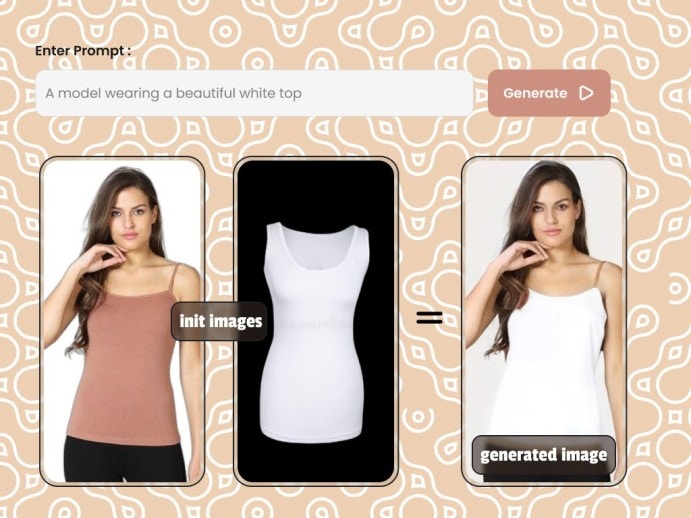
> This endpoint allows you to wear a cloth image sample on an existing model body.
 Make sure you add your [s3 details](/enterprise-api/general/update-s3-details) for `image_editing` server, so you can receive image generated in your bucket. Images generated without s3 details being added will be delete after **24hours**
## Request
Make a `POST` request to below endpoint and pass the required parameters as a request body to the endpoint.
```curl curl theme={null}
--request POST 'https://modelslab.com/api/v1/enterprise/image_editing/fashion' \
```
## Body
```json json theme={null}
{
"key": "enterprise_api_key",
"prompt": ":A realistic photo of a model wearing a beautiful t-shirt",
"negative_prompt": "Low quality, unrealistic, bad cloth, warped cloth",
"init_image": "https://assets.modelslab.ai/generations/3227c6c5-14f6-4755-8be5-4f96c0fe988c.jpg",
"cloth_image": "https://assets.modelslab.ai/generations/e202dba8-d3da-4bf6-9849-dc0535563e57.jpg",
"cloth_type": "upper_body",
"guidance_scale": 7.5,
"num_inference_steps": 21,
"seed": null,
"webhook": null,
"track_id": null
}
```
## Body Attributes
Your API Key used for request authorization
Image URL of the model to try the dress on
Cloth/Dress URL for the garment to try-on
One of `upper_body`, `lower_body` or `dresses` based on where the garment is to be worn
Text prompt with description of the things you want in the image to be generated
Items you don't want in the image
Number of denoising steps. Value accepted are 21, 31 or 41
Scale for classifier-free guidance (minimum: 1; maximum: 20)
Random seed for reproducible results
Set an URL to get a POST API call once the image generation is complete
This ID is returned in the response to the webhook API call. This will be used to identify the webhook request
Make sure you add your [s3 details](/enterprise-api/general/update-s3-details) for `image_editing` server, so you can receive image generated in your bucket. Images generated without s3 details being added will be delete after **24hours**
## Request
Make a `POST` request to below endpoint and pass the required parameters as a request body to the endpoint.
```curl curl theme={null}
--request POST 'https://modelslab.com/api/v1/enterprise/image_editing/fashion' \
```
## Body
```json json theme={null}
{
"key": "enterprise_api_key",
"prompt": ":A realistic photo of a model wearing a beautiful t-shirt",
"negative_prompt": "Low quality, unrealistic, bad cloth, warped cloth",
"init_image": "https://assets.modelslab.ai/generations/3227c6c5-14f6-4755-8be5-4f96c0fe988c.jpg",
"cloth_image": "https://assets.modelslab.ai/generations/e202dba8-d3da-4bf6-9849-dc0535563e57.jpg",
"cloth_type": "upper_body",
"guidance_scale": 7.5,
"num_inference_steps": 21,
"seed": null,
"webhook": null,
"track_id": null
}
```
## Body Attributes
Your API Key used for request authorization
Image URL of the model to try the dress on
Cloth/Dress URL for the garment to try-on
One of `upper_body`, `lower_body` or `dresses` based on where the garment is to be worn
Text prompt with description of the things you want in the image to be generated
Items you don't want in the image
Number of denoising steps. Value accepted are 21, 31 or 41
Scale for classifier-free guidance (minimum: 1; maximum: 20)
Random seed for reproducible results
Set an URL to get a POST API call once the image generation is complete
This ID is returned in the response to the webhook API call. This will be used to identify the webhook request